

Payments
This job is part of a TrackCard Bundle. You travel to the artist for a 2-hour mobile recording session that is already paid. You receive R800 for the session, plus a R250 call-out fee, credited to your account once you upload the vocal takes.
If the session runs beyond 2 hours, you can request overtime when you submit your update (R400 per extra hour). Overtime is paid to you in full once the client pays.
Your job
Take your gear to the artist and capture the best vocal performances you can. Prepare clean vocal takes so the mixing and mastering engineer who follows can do their best work.
Before you leave
- Pack a complete mobile kit: laptop, interface, microphone, reflection filter, pop filter, cables, a stand, and 2 pairs of headphones.
- Studio monitors are optional.
- Confirm the session with the artist. After you accept the booking, their contact number is on the Mobile Recording card under Manage Trackcards. Ask about access, parking, and where in the space you will set up.
- In your DAW, import the client’s beat as a .wav or .mp3. The beat is attached to the booking email, and you can also open it from My Profile → Producer suite → Manage Trackcards.
- Listen to the beat at least once before you arrive.
Tip: If you are still setting up when you arrive, ask the artist to warm up and practise their lyrics while you finish.
At the session
- Introduce yourself and explain what you will do. Keep the room calm and the instructions simple.
- Set up in the quietest part of their space. Perform gain-staging on your interface so the signal is strong without clipping. Ask the artist to sing the loudest part of the song (usually the chorus), and set the signal to average around −10 to −18 decibels.
- Set up live monitor effects: Before tracking begins, apply real-time effects (Autotune, reverb, delay, and light compression) to the artist’s headphone monitor mix. This gives the artist immediate confidence and an idea of their final sound. Ensure these effects are running live during both recording and punch-in playback pre-rolls.
- Ask the client to perform the song from start to finish. These scratch vocals show you the song and help you mark its structure.
- Use markers to define the structure and create the empty vocal tracks you need: verse, chorus, bridge, and so on.
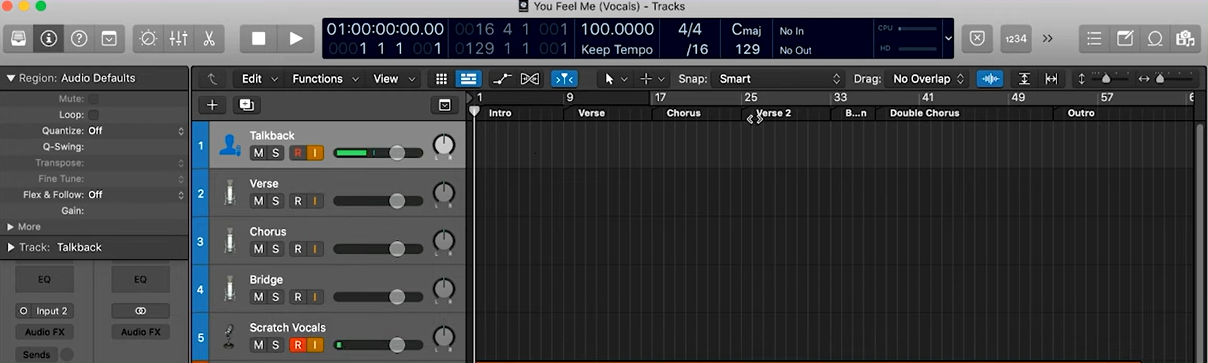
- Record several takes of each section and guide the artist toward the best performance using seamless punch-ins.


- If the recording has too many pops, use a pop filter and keep the artist about 5 fingers from the microphone.
- Watch for fatigue and give them a few minutes when they need a break.
- If they want ad-libs, record those against the scratch vocals.

We’re done!
That is what the mobile session needs.
After the session — submit your update
Open the client’s TrackCard from My Profile at the top right, then Producer suite, then Manage Trackcards. Under Mobile Recording, find the client’s TrackCard and click Submit update.

Fill in the form:
- Enter the actual session hours you recorded.
- The client’s bundle already covers 2 hours. If you entered more than 2 hours, choose whether to request overtime payment from the client (extra hours at R400 each), or leave the extra time unpaid.
- Upload raw vocal files: Consolidate and export all the final vocal takes as completely raw .WAV files inside a single .zip archive. Do not bounce or print your monitor effects (Autotune, reverb, delay) onto these files. The mixing engineer needs completely clean audio to do their job.
- If a specific Autotune key, speed, or style setting was crucial to the artist’s performance on-site, leave a note about it in Session Notes.
- Click Submit.

If the session stayed within 2 hours (or you chose not to bill overtime): the TrackCard is completed, the client is notified, and your R800 for the included session is credited to your account.
If you requested overtime payment: the client is emailed and asked to pay for the extra hours (R400 each). Once payment is received, that overtime amount is credited to you in full. The vocal files stay locked for the client until they pay the overtime; once paid, they can download them.


